
Field Input Validation Using Regex
What is regex?
Regex (short for regular expression) is a tool used to define patterns within text.
It’s like a flexible search filter that can find, match, or validate specific sequences of characters such as email addresses, phone numbers, postcodes, or dates.
How to use regex in your form
The Short Answer field (under Advanced Settings) includes a variety of input validation options. However, if these don’t meet your specific needs, the Custom Regex option lets you define your own validation rules using a regex pattern.
Example:
Let’s say you want to ensure form users enter a Medicare card expiry date in the format YYYY-MM.
A regex pattern for that would look like this:
^d{4}-d{2}$
Here’s how that breaks down:
^ = start of the string
d{4} = exactly 4 digits (the year)
- = a dash
d{2} = exactly 2 digits (the month)
$ = end of the string
In plain English: Only allow a value that starts with exactly four numbers, followed by a dash, and ends with exactly two numbers.
Tip: If you need help creating a regex pattern for your specific use case, please contact our Support team.
You can also specify a validation error message that will display below the field when the input does not match the regex pattern. This ensures form users receive clear feedback on what needs to be corrected before they can submit the form.
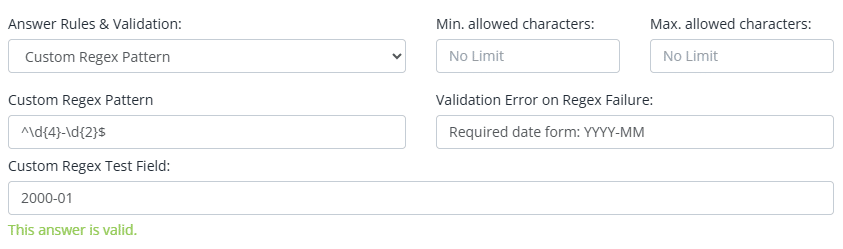
Tip: Use the Custom Regex Test Field to test your regex pattern.
Commonly used regex patterns
| Use Case | Regex Pattern |
| Start with +61 | +614d{8} |
| Australian Phone Number (With or Without Country Code) | ^(+61|0)[2-478]( ?d){8}$ |
| US Phone Number | ^([0-9]{3})[0-9]{3}-[0-9]{4}$ |
| Australian Driver’s License (General Format) | [A-Za-z0-9]{6,10}$ |
| Australian Business Number (ABN) | ^d{11}$ |
| Tax File Number (TFN) | ^d{8,9}$ |
| Only accept numbers with two decimal places | ^$?(d{1,3})(?:,(d{3}))*.d{2}$ |
| Australian Vehicle Registration Plate | ^[A-Z]{2,3}-?d{2,3}[A-Z]?$|^d{1,6}$ |
| Medicare card expiry date in the format YYYY-MM | ^d{4}-d{2}$ |
| Use custom validation to ensure two fields match, e.g. confirm email | ^{{field_1}}$
(Replace {{field_1}} with the correct field short-code from your form) To learn more, see How to Add a “Confirm Email” Field to Your Form |
| Use custom validation to ensure two fields don’t match, e.g. Manager Approval fields | ^(?!{{field_1}}$).*$
(Replace {{field_1}} with the correct field short-code from your form) |