
Two-factor authentication
Two-factor authentication (2FA) strengthens your account security by requiring two verification steps at login.
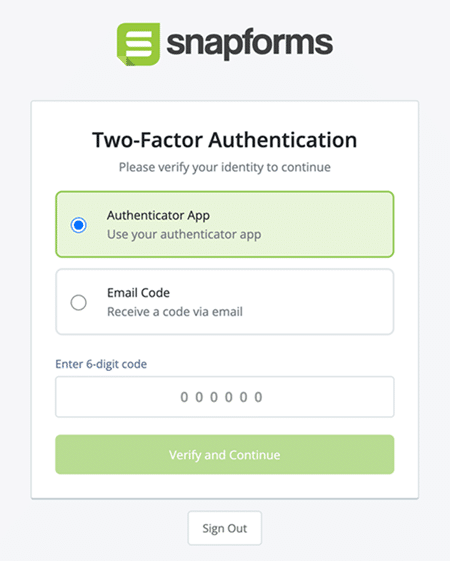
After enabling 2FA in Account Settings, logging into your account will require your password, followed by a one-time verification code to confirm your identity. The code will either come from an authenticator app on your mobile phone or sent to your email, depending on your chosen 2FA method.
You can enable multiple 2FA methods and choose which one to use when logging in. This gives you a backup option in case you lose your device or can’t access your authenticator app.
Enable authenticator 2FA
- Navigate to Account Settings > Two-Factor Authentication.
- On the Authenticator App method, click Enable.

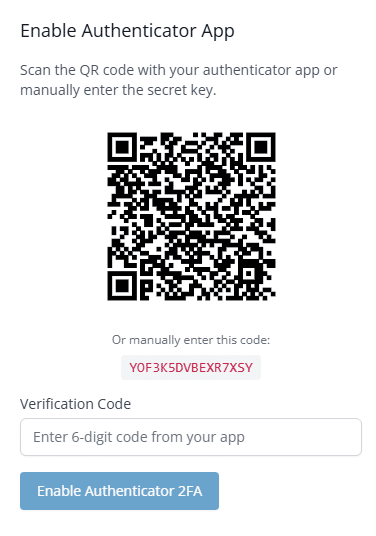
- Open your authenticator app on your mobile phone (e.g. Google Authenticator), and add your Snapforms account by scanning the QR Code. Alternatively, you can manually enter the code into your authenticator app.
- Enter the 6-digit verification code generated by your authenticator app.
- Click Enable Authenticator 2FA.
Disable authenticator 2FA
- Navigate to Account Settings > Two-Factor Authentication.
- On the Authenticator App method, click Disable.
- Open your authenticator app on your mobile phone and generate a verification code.
- Enter the verification code.
- Click Disable Authenticator 2FA.
Enable email 2FA
- Navigate to Account Settings > Two-Factor Authentication.
- On the Email method, click Enable.
- Click Send Code. Check your mailbox for an email from Snapforms containing a one-time verification code.
- Copy/paste in the verification code.
- Click Enable Email 2FA.
Disable email 2FA
- Navigate to Account Settings > Two-Factor Authentication.
- On the Email method, click Disable.
- Click Send code via email. Check your mailbox for an email from Snapforms containing a one-time verification code.
- Copy/paste in the verification code.
- Click Disable Email 2FA.