Health Check
As your organisation grows, managing security, compliance, and form best practices can feel like moving targets. The Snapforms Health Check simplifies this by doing the heavy lifting for you.
The tool continuously monitors your Snapforms account to flag areas for improvement across two key areas:
- Organisation Settings – Ensuring global security and compliance standards are met.
- Form Configurations – Guarding against data collection risks and broken workflows.
Findings refresh automatically as changes occur, keeping your compliance posture current and your next actions clear.
How to access the Health Check dashboard
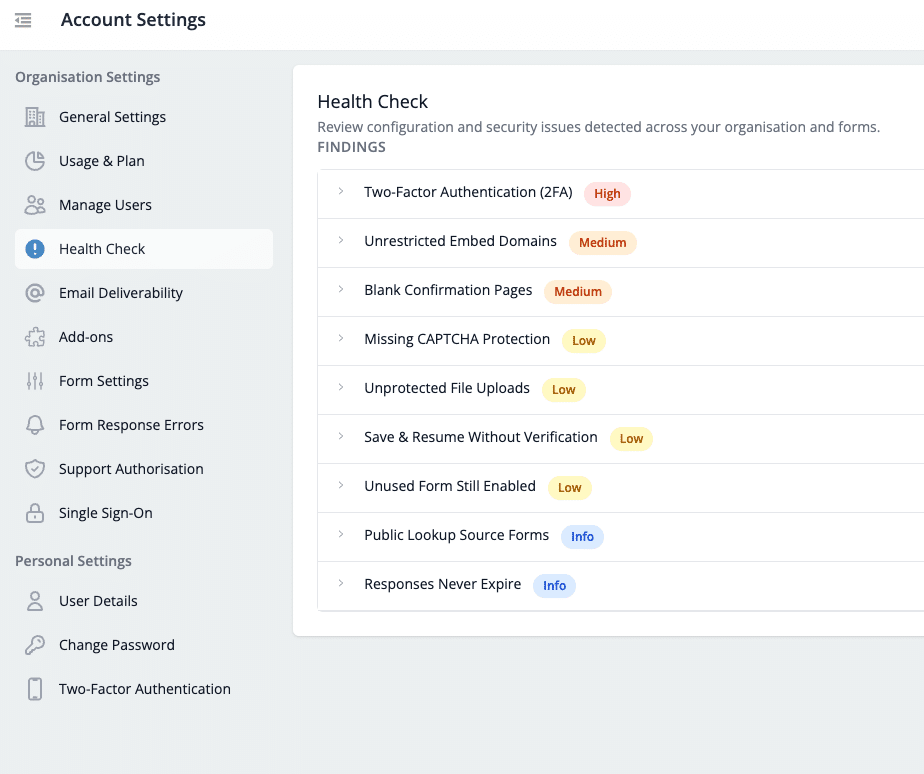
Organisation Admins can access the Health Check dashboard in Account Settings > Health Check.
Understanding the findings
Each health check finding is assigned a risk level to help you prioritise remediation based on severity. Use the table below to identify the different findings, their implications, and the steps needed to resolve them.
| Finding Type | Description | Risk Level | Remedial Action |
| Organisation Checks | |||
| Two-Factor Authentication (2FA) | Accounts without 2FA are more vulnerable to unauthorised access and data exposure. | High | Request all users to enable 2FA in their personal settings. |
| Responses Never Expire | Keeping responses forever can increase privacy, compliance, and storage risks over time. | Info | Set an auto-delete response retention policy so older submissions are deleted when they are no longer needed.
*Available on the Enterprise plan only |
| Form Checks | |||
| Unrestricted Embed Domains | Forms that can be embedded anywhere increase the risk of misuse or unauthorised data collection. | Medium | Restrict embed domains to trusted websites to maintain control over where your forms appear. |
| Blank Confirmation Pages | Users receive no clear confirmation after submitting, which can cause confusion or duplicate submissions. | Medium | Add a confirmation message or next steps to improve user experience and submission clarity. |
| Missing CAPTCHA Protection | Public forms without CAPTCHA are more exposed to spam, abuse, and automated submissions. | Low | Enable CAPTCHA to protect data quality and reduce unwanted or malicious submissions. |
| Unprotected File Uploads | Uploaded files may contain sensitive information and are more exposed when login protection is disabled. | Low | Enable login protection for uploaded files to ensure only users that are securely logged into the Snapforms platform can access those files. |
| Save & Resume Without Verification | Unverified save links can be accessed by unintended users, risking data exposure. | Low | Enable email verification to ensure only the original respondent can resume their submission |
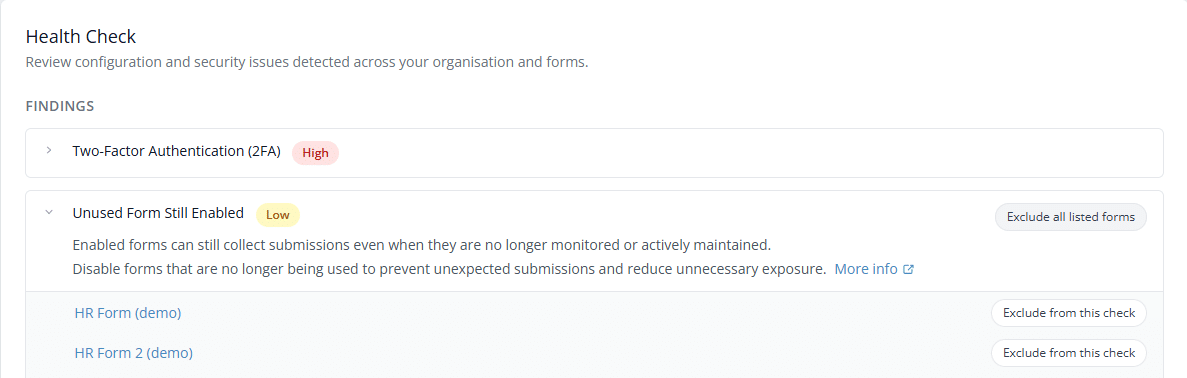
| Unused Form Still Enabled | Enabled forms can still collect submissions even when they are no longer monitored or actively maintained. | Low | Disable forms that are no longer being used to prevent unexpected submissions and reduce unnecessary exposure. |
| Public Lookup Source Forms | Lookup source forms can expose or change reference data when they remain public and open for submissions. | Info | Password-protect the source form, or set a response limit to disable the form once lookup data is collected. |
How to resolve findings or exclude from check
- Click on a finding to view the flagged forms or organisation settings.
- Follow the inline remediation guidance, or refer to the table above.
- (Optional) To exclude forms from a health check, choose either:
- Exclude from this check, or
- Exclude all listed forms from this check

- Enter a reason the check is not relevant to the excluded forms.